MIMOSI Help Guide
  • Home
  • EcoChem
  • MIMOSI Connect
  • MIMOSI Mobile
  • All Docs

EcoChem

  • Login
  • Add Test Users
  • View a Company’s Products
  • Create Products
    • Introduction
    • Create Ingredients
    • Ingredient Spellchecker
    • Edit Ingredient
    • Create a New Product
    • Harmonized System Codes
    • Batch and Serial Number Ranges
    • Recyclability Declarations
    • Full Disclosure vs Partial Disclosure of Ingredients
    • Clone a Product
  • Search
    • Introduction
    • View and Search All Products
    • Ingredients Search
  • View Product Information
    • Introduction
    • Overview
    • Ingredients
    • Chemistry
  • Add Integrations for Software Clients
  • Test Data
    • Introduction
    • Description of the Cosmetics Data Test Set
    • Description of the Plastics Data Test Set
    • Description of the Regulations Data Test Set
  1. Home
  2. EcoChem
  3. Create Products
  4. Edit Ingredient

Edit Ingredient

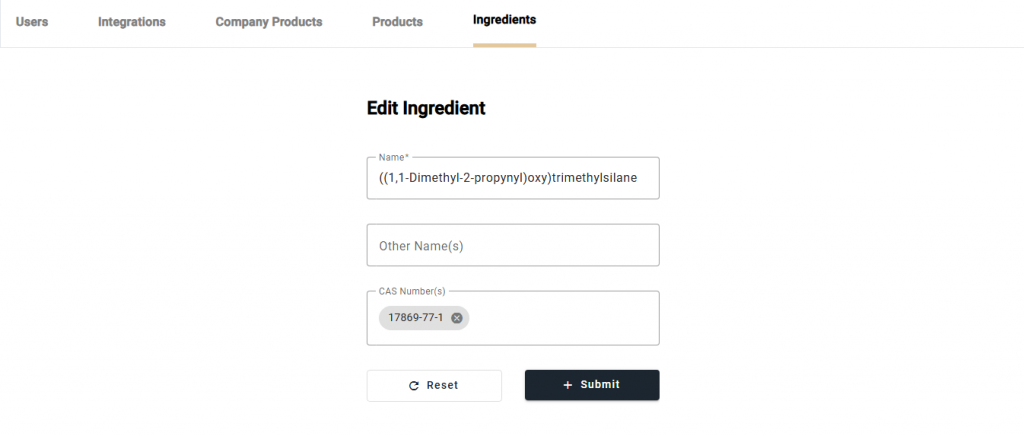
Navigate to the Ingredients page from the navbar. On this page, there is a listing of all the ingredients in the EcoChem database. Edit a specific ingredient by selecting the [Edit] button for a particular ingredient.
Updated on October 30, 2024

Doc navigation

← Ingredient SpellcheckerCreate a New Product →
© 2026 MIMOSI Help Guide
Proudly powered by WordPress | Theme: weDocs by Tareq Hasan